
Live webinars help marketers and sales teams nurture leads, build trust, and improve conversions. But “just going live” isn’t enough — you need the right content, the right platform, and a clear plan for what happens before and after the event. Here’s everything you need to know.
|
📌 Key Insights
|
What Is a Live Webinar?
A live webinar is a virtual event — a meeting, presentation, or seminar conducted online in real time. Hence the word web-inar. Some people call them web conferences or web seminars, but the core idea is the same: a presenter shares content with an audience that can interact, ask questions, answer live polls, and vote — all without being in the same room. Webinars provide businesses with something rare: the reach of a broadcast combined with the feel of a conversation.
To understand where live webinars sit in the landscape of online events, it helps to look at the full spectrum:
- Online meetings — digital get-togethers for small groups of up to 25, where everyone can turn on their webcam and microphone. Maximum interactivity, but limited scale.
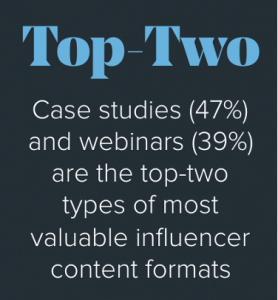
- Live webinars — the sweet spot. You can bring together up to 1,000 attendees: leads, customers, trainees, or students. The audience is large, but real-time interaction is still very much alive through chat, live polls, and Q&A. In fact, webinars are ranked as the second-most valuable influencer content format in B2B marketing.
- Webcasts / virtual conferences — broadcast-style virtual events for up to 10,000 viewers. Reach is massive, but real-time interaction drops significantly.
As you can see, there are different types of virtual events to choose from. For the sake of this article, we’ll focus on live webinars — the format that marketers and sales teams reach for most often, and for good reason.
Live vs. Automated vs. On-Demand Webinars – what are the differences?
Before you start hosting a webinar, it’s worth knowing which type suits your goal. Not every situation calls for going live. Here’s a quick breakdown:
- Live webinars. The classic format — you schedule an event at a specific time and meet your audience in real time. Ideal for onboarding, product demos, and sales events where audience engagement matters most.
- On-demand webinars. You pre-record your session and release it so attendees can watch anytime. If lead generation or online courses are your goal, on-demand webinars let your content work around the clock.
- Automated webinar. You schedule a pre-recorded webinar to run on a specific day and time — complete with calls-to-action and surveys. The whole thing runs on autopilot, though you can join as host to moderate chat in real time if you choose.
Of the three, live webinars offer the most opportunities for immediate lead generation and nurturing. There’s something about real-time interaction with a real human that a pre-recorded video simply can’t replicate — and your audience knows the difference.
|
Ready to host your first live webinar? ClickMeeting makes it easy to set up, promote, and run professional webinars — no technical headaches required. |
How to Create Content for Your Live Webinar?
Have you ever sat through a webinar that went on forever and said very little? The good news is that with a bit of structure, your event doesn’t have to feel that way. Research shows that 63% of people are willing to spend between 20 and 60 minutes watching a webinar — so that’s a solid target range for most sessions.
Data from ClickMeeting’s State of Online Events 2025 report shows that the average event on the platform lasted 102 minutes. Paid webinar sessions — where attendees have invested money to be there — ran an average of 131 minutes, because those audiences show up expecting depth, not a surface-level overview.
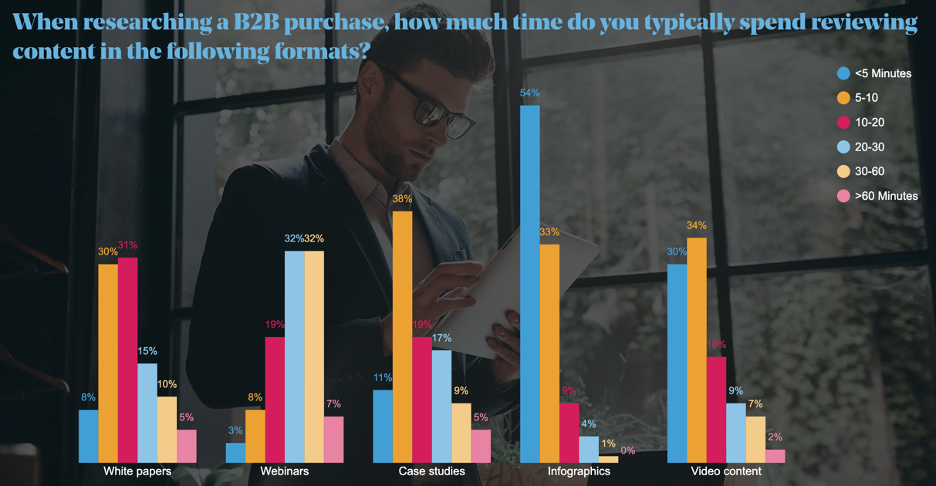
A practical structure for a standard webinar looks like this:
- Introduction — 5 minutes. Set the scene, introduce yourself, and let people know what they’ll walk away with.
- Main presentation — around 25 minutes. Break it into 5-minute chunks per key point to keep things digestible. Use screen share to walk through demos or slides.
- Live Q&A — 10 minutes. This is where real-time interaction does its best work.
- Wrap-up — under 5 minutes. Summarise key takeaways, share your CTA, and thank your audience.
When it comes to your slides, less is more. Use visuals, colors, and graphics to support your words — not replace them. One idea per slide is a good rule. And resist the urge to read from your slides. Your audience came to hear you, not your bullet points.
One more thing worth mentioning: dial back the sales pitch. Research shows that 96% of B2B buyers say vendors could improve content quality simply by reducing sales messaging. The webinars that convert best teach something genuinely useful — and let the product speak for itself in context.
How to Choose the Right Format for Your Live Webinar?
There’s no one-size-fits-all webinar format. The format you pick should match what you want your audience to do next. Here’s a look at the most common webinar types and when each one works best:
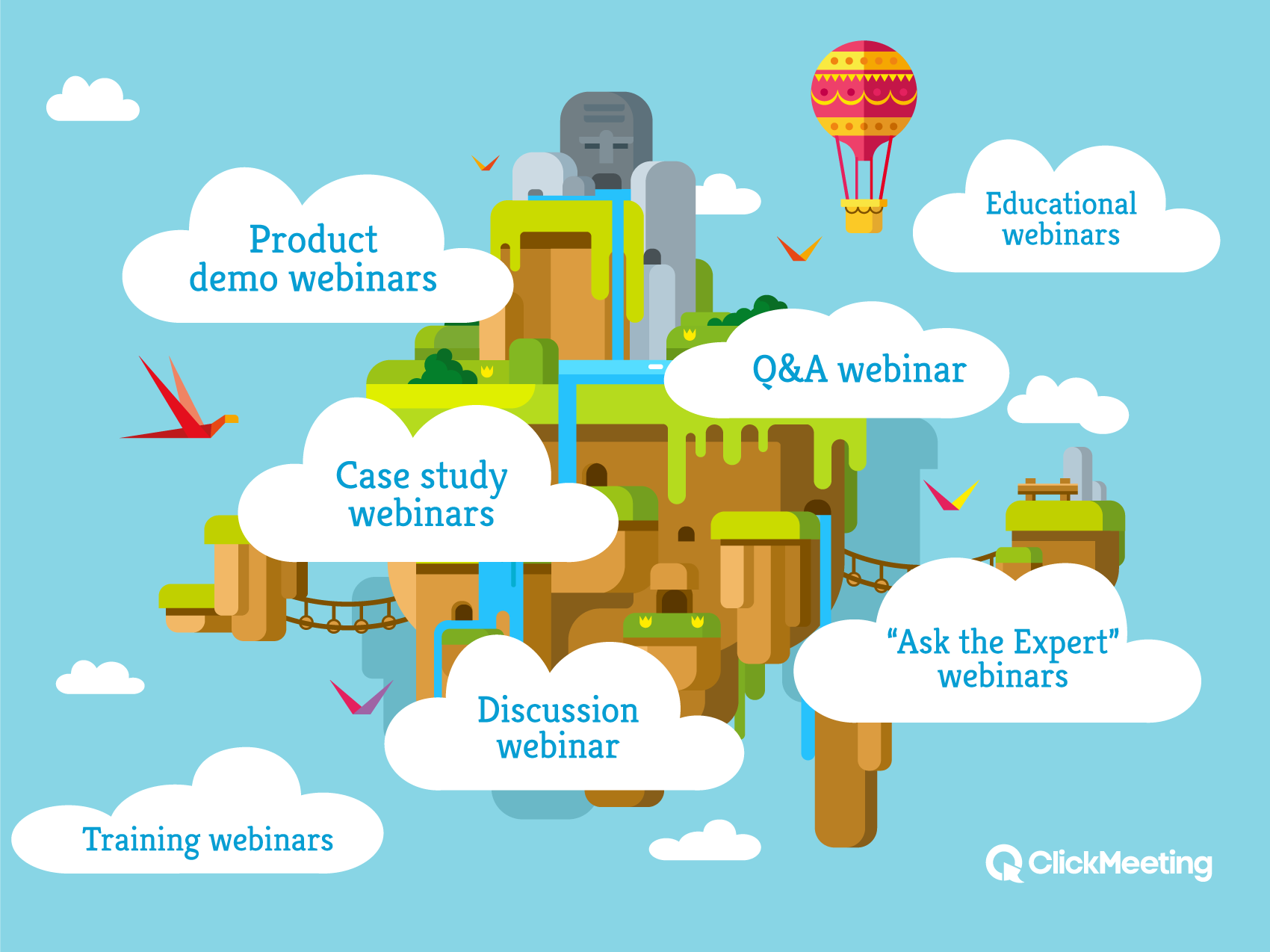
- Product demo webinars. Walk your audience through your product in a real scenario. Demos build trust faster than any brochure and are engaging and interactive by nature — attendees can ask questions as they watch.
- Case study webinars. Show how a real customer solved a real problem using your solution. Consider inviting the customer to join you live — it adds credibility and keeps the story authentic.
- Educational webinars. Teach something valuable. If you sell financial services, host a session on personal budgeting. You position yourself as an expert, and your audience shows up voluntarily because the content genuinely serves them.
- Training webinars. Perfect for onboarding or helping existing customers get more value from your product. Breakout rooms can be especially useful here — letting smaller groups work through exercises together during live sessions.
- Q&A webinars. Let audience questions drive the content. Great as follow-up webinar sessions to earlier events, covering questions you didn’t get to the first time.
- “Ask the Expert” webinars. A credentialed guest answering questions live. These are excellent for establishing authority and attracting a new audience through the guest’s own network.
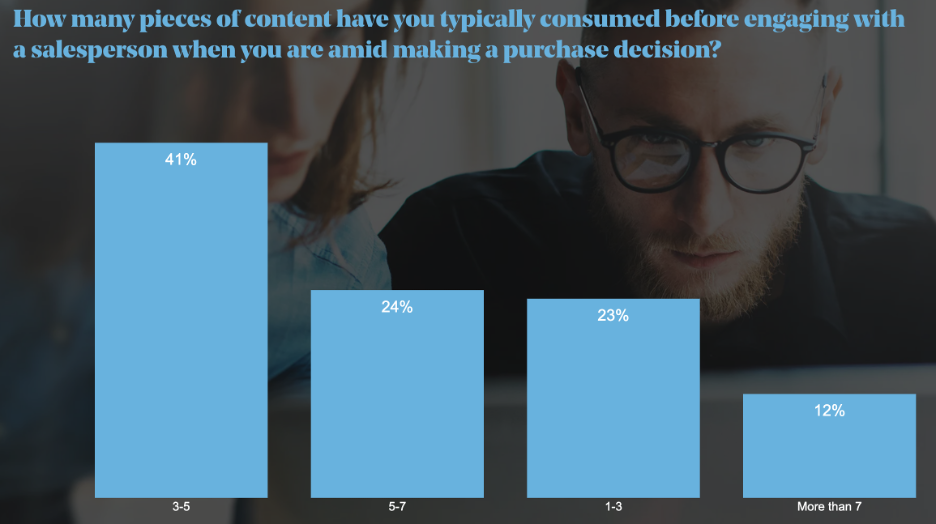
Remember: 41% of B2B buyers consume 3–5 pieces of content before making a purchase decision. A single live webinar is rarely the whole journey — think about how it connects to your blog posts, case studies, and email sequences.
Should You Invite a Guest for Your Webinar?
Even if you’re not running an “Ask the Expert” format, a guest speaker can transform a good webinar into a great one. They add a fresh perspective, take some of the pressure off the presenter, and — if they have their own audience — bring new faces into your orbit.
More than half of B2B buyers say the quality of speakers directly influences whether they’re willing to share their contact information to access a webinar. That’s lead generation working through credibility, not cold outreach. And if your guest has a loyal following of their own, the webinar promotion almost takes care of itself.
|
“ Live webinars are one of the few formats where you can genuinely engage with your audience in real time and gather instant feedback. At ClickMeeting, we see it every day — the hosts who use interactive elements like polls, live chat, and Q&A don’t just inform their audience, they build a relationship with them. That’s what turns attendees into customers. The webinar experience doesn’t end when the session closes; it’s just the beginning of a much longer conversation. Tomasz Bołcun, Brand Manager @ ClickMeeting |
How to Promote Your Webinar?
With tens of thousands of online events happening every week, you can’t just publish a registration page and hope people show up. Effective webinar promotion happens in two phases: getting signups, then converting those signups into actual attendees on the day.
To promote your webinar through email is still one of the most reliable tactics. Build a dedicated campaign for your existing list — ideally a sequence that starts 1–2 weeks before the event and includes a final reminder the morning of. Pair that with the following channels:
- Organic social media. LinkedIn works especially well for B2B webinars. Share teaser content and countdown posts in the days leading up to the event.
- Paid social. Run targeted campaigns to reach a relevant audience beyond your existing followers.
- Your website. Add a clear CTA to your homepage and write a blog post previewing the topics you’ll cover.
- Guest speakers. Ask them to share with their own audiences. Their endorsement carries real weight.
- Registration form. Use a built-in registration form to collect names, emails, job title, and company size. This data is invaluable for follow-up and CRM segmentation.
Getting the signup is only half the battle. Send calendar invites and automated reminders to keep your event front of mind. With ClickMeeting, you can automate this entire reminder flow — so you’re not manually chasing people the morning of your event.
▶ Try ClickMeeting Free for 14 Days
How to Host Live Webinars Without Technical Disasters?
You’ve got your content ready, your guest confirmed, and your registration form live. Now comes the actual job of hosting live webinars — and the one guarantee in this business is that something unexpected will happen at some point. The key is having a contingency plan before you need one.
Here’s what to prepare for and how to handle each scenario:
- Computer crash. Log into two devices before the event starts. If one freezes, switch immediately. Close all other apps beforehand and make sure your laptop is fully charged.
- Internet outage. Set up your phone as a mobile hotspot as a backup. For mission-critical live sessions, a dedicated 4G hotspot device is worth the investment.
- Audio/video failure. Run a full AV check before you go live. ClickMeeting’s built-in system configuration tool lets you test your microphone, webcam, and browser connection in advance — not as the event starts.
- No-show guest. Get your guest’s mobile number before the event and have backup content ready in case they can’t join.
Beyond contingency planning, practice matters. Do a dry run using your webinar platform — with slides loaded, screen share active, and someone playing the role of an attendee. Record it and watch it back critically. You’ll spot things you’d never catch in real time.
For hosting a webinar with a large audience, features like breakout rooms, live polls, caption support, and moderated Q&A keep the session from feeling like a broadcast and make every attendee feel like they’re part of the conversation. These engagement tools are the difference between a forgettable presentation and a successful webinar that people talk about afterward.
What Does It Cost to Host Live Webinars?
If you’re worried that hosting live webinars will blow your budget, the actual cost breakdown is more manageable than you might expect. Here’s what you’ll need to account for:
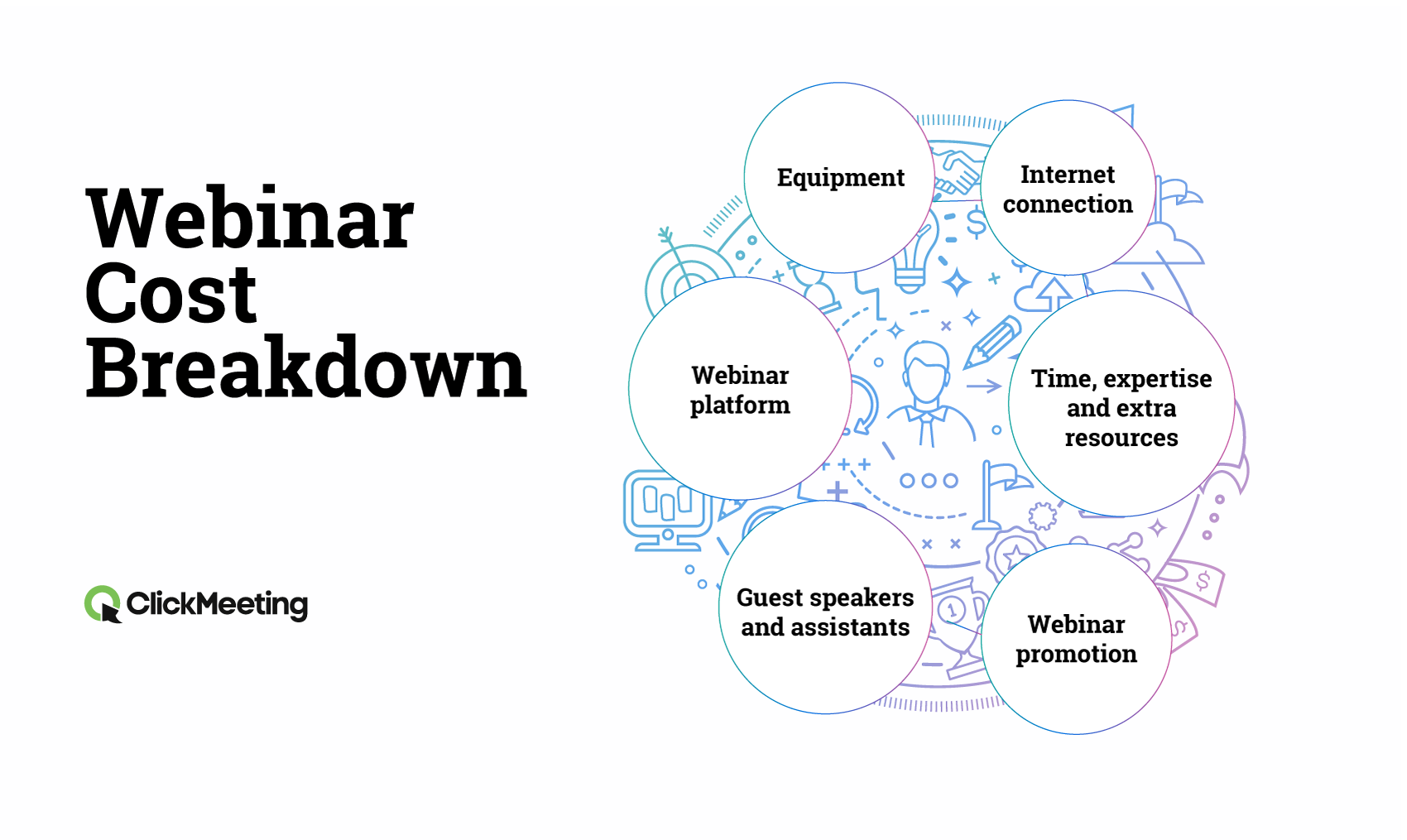
- Equipment. At minimum: a computer or mobile device with a camera, a decent USB microphone, and headphones. You can start with what you already have.
- Internet connection. You need a stable, high-speed connection. Poor connectivity kills audience engagement instantly — this isn’t optional.
- Webinar platform / webinar software. An all-in-one webinar solution like ClickMeeting covers registration, live video, polls, screen share, event recording, analytics, and CRM integrations — eliminating the need to pay for separate tools.
- Content creation time. Your team’s time is a real cost, even when it’s internal. Factor it into your planning from the start.
- Advertising. Paid promotion on social platforms will help you reach beyond your existing audience.
- Guest speakers. Some will participate for exposure; more experienced speakers may charge a fee.
The good news: you likely already have most of what you need to run your first event. Start lean, measure your results with detailed analytics, and scale from there.
How to Make the Most of Your Webinar Recording?
Live events are powerful, but they’re time-bound. Not every lead can attend at the scheduled time — and that’s fine, as long as you’ve recorded the session and made it accessible afterward. Webinar recording is one of the smartest ways to extend the ROI of every event you run.
Here’s why recording every session is non-negotiable:
- Not everyone can tune in live. A potential customer in a different time zone or with a scheduling conflict can still watch the on-demand version and convert afterward.
- Recordings become evergreen assets. Upload to your blog, share via email, or offer as a lead magnet. Half of professionals share webinar content with colleagues — your reach grows without any additional effort.
- Repurpose the content. Clips become social posts; transcripts become blog articles; Q&A answers become FAQs. One live session can fuel weeks of content.
- You can improve. Watching yourself back is uncomfortable but invaluable. You’ll spot pacing issues, unclear explanations, and moments where attendees likely tuned out.
- Integration amplifies everything. Connect your webinar platform with your email marketing tool and CRM to automatically follow up with attendees, track their engagement, and move them through your funnel. ClickMeeting supports integration with major marketing platforms out of the box.
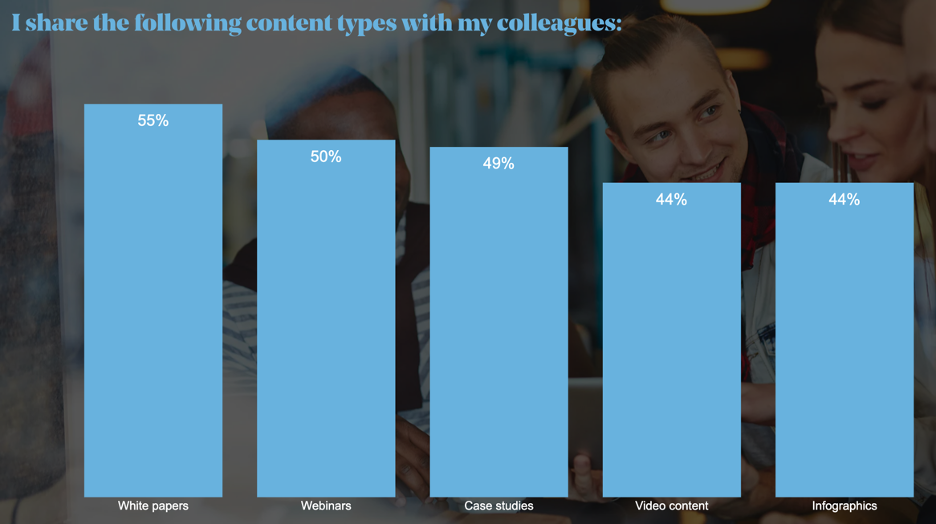
Make sure your webinar platform includes a built-in recording feature — relying on external screen recorders is clunky and one more thing that can fail mid-session. ClickMeeting records automatically, stores the event recording securely, and lets you share a link with registrants immediately after the session ends.
|
ClickMeeting is the all-in-one webinar platform used by thousands of businesses across Europe. From registration to recording to post-event analytics — everything in one place, GDPR-compliant, and built for professional webinars. |
How to Choose the Right Live Webinar Platform?
Not all webinar tools are built the same. If you’ve been comparing options — whether it’s Zoom webinars, GoTo Webinar, the ON24 platform, or something else — here’s what actually matters when you’re hosting live webinars on a regular basis. Think of it as your checklist for a reliable webinar platform:
- Registration form and landing page builder — customise your registration page without touching a line of code.
- Automated reminders — the platform should handle email notifications to registrants automatically.
- Interactive tools — live polls, Q&A, chat, screen share, breakout rooms, and caption support for accessibility.
- Live stream and on-demand options — broadcast live video and offer on-demand webinars from a single platform, including live webinars directly to YouTube or Facebook.
- Webinar recording — automatic, reliable, and stored securely in the cloud.
- Detailed analytics — who attended, for how long, which polls they answered, what they clicked. Real data to improve every event.
- CRM and integration support — connect your webinar data to the rest of your marketing stack without manual exports.
- Audience size flexibility — support for a large audience without the platform buckling under pressure.
- GDPR compliance — especially critical for European businesses running virtual conferences with international attendees.
ClickMeeting is an all-in-one webinar solution built with all of these features. Unlike a free version of Zoho Webinar or a limited free plan tool, it’s designed for professional webinars from day one. It’s an easy-to-use platform that doesn’t require IT support to set up or run — making it a hassle-free webinar experience from the moment you log in.
Whether you’re running events and webinars for lead generation, webinar and virtual training sessions for your team, or live sessions for your existing customers, having the right live webinar platform underneath you makes all the difference. Webinars using ClickMeeting also support a free 14-day trial — so you can explore all the webinar features, interactive elements like polls and breakout rooms, and the full webinar experience before committing to a plan. Webinar technology should work for you — not the other way around.
Frequently Asked Questions
Below you’ll find answers to the most common questions about live webinars — covering everything from the basics to platform choices and technical setup.
What is a live webinar, exactly?
A live webinar is a virtual event hosted in real time over the internet, where a presenter delivers content to an audience that can interact via chat, polls, and Q&A. It combines the scale of a broadcast with the feel of a conversation — and unlike a video call, it can accommodate hundreds of attendees at once.
How is a live webinar different from video conferencing?
Video conferencing is typically used for smaller groups where everyone participates equally. A live webinar has a defined presenter and a larger, structured audience — sometimes hundreds of attendees — with interactive elements managed by the host rather than everyone talking at once.
How long should a live webinar be?
Most research points to 20–60 minutes as the sweet spot for general webinars. However, ClickMeeting’s State of Online Events 2025 data shows that paid webinar sessions average 131 minutes — audiences who invest money expect more depth and are willing to stay longer.
What equipment do I need for hosting a webinar?
At minimum: a computer or mobile device with a camera, a decent microphone, and a stable internet connection. A dedicated USB microphone improves audio quality significantly. Headphones help prevent echo. You don’t need a professional studio to run professional webinars.
What’s the difference between live and automated webinar formats?
A live webinar happens in real time with you presenting. An automated webinar uses a pre-recorded video scheduled to run at a specific time — it can include interactive elements but runs without you actively presenting. On-demand webinars can be watched anytime after they’re recorded.
How do I promote my webinar effectively?
Use a combination of email marketing, social media (organic and paid), your website, and your guest speakers’ channels. Make sure your registration form collects useful data, and set up automated reminders to reduce no-shows on the day of the event.
What interactive tools should I use during a webinar?
Live polls are one of the most effective engagement tools — use them to gather feedback or check audience understanding. Screen share helps when demonstrating a product. Q&A lets attendees ask questions without disrupting the flow, and breakout rooms work well for training sessions that need small-group work.
Should I record my webinars?
Yes, always. Webinar recording lets registrants who couldn’t attend watch on-demand afterward, extends the content’s lifespan, and gives you footage to repurpose across channels. Use a platform with built-in recording so you’re not relying on external tools that can fail at the worst moment.
How does ClickMeeting compare to GoTo Webinar or Zoom webinars?
ClickMeeting is a European-built, GDPR-compliant webinar platform covering the full workflow: registration, live events, on-demand webinars, automated reminders, detailed analytics, and CRM integration. Compared to GoTo Webinar or Zoom webinars, ClickMeeting is particularly strong for businesses that prioritise data sovereignty, ease of use, and a complete all-in-one webinar solution without needing third-party add-ons.
Is there a free trial available?
Yes. ClickMeeting offers a free 14-day trial — no credit card required. You get access to the full feature set, including live video, screen share, live polls, registration forms, automated reminders, and event recording. It’s the easiest way to see whether the platform fits your workflow before committing to a plan.
|
Stop piecing together different tools for every webinar. ClickMeeting is the easy-to-use platform that handles everything — from registration to recording to post-event analytics. |