
Hosting a webinar sounds complicated — until you’ve done it once. The right webinar platform handles the technical side: registration pages, reminder emails, recordings, and follow-ups. Your job is to show up with something worth saying. This step-by-step guide walks you through everything: how to plan, host, and follow up on every type of webinar, so you can host a successful webinar without the guesswork.
|
📌 Key Insights
|
How to host a webinar — what does the process actually look like?
A webinar is an online event where one or more presenters deliver a live or pre-recorded session to an audience over the internet. Unlike a video call, a webinar is structured around presentation mode: the host speaks, attendees watch and interact via chat, polls, or a Q&A session, and the format scales from 10 to 10,000 participants without changing how it works for the presenter. Platforms like Zoom, Microsoft Teams, and Webex started as meeting tools and added webinar features later — ClickMeeting was built as a dedicated webinar platform from day one, which shows in how registration, automation, and follow-up are integrated from the start. 
The basic mechanics of hosting a webinar are simpler than most people expect. You need a reliable webinar platform, a compelling topic, and a way to get people to register — everything else, including reminder emails, recording, and follow-up sequences, can be automated. Below is the general flow before we dive into each webinar type in detail.
What are the steps to host a webinar on ClickMeeting?
Here is the core process for anyone hosting their first webinar or switching from another platform. ClickMeeting is browser-based — no app required for the host or for attendees who want to join a webinar, which removes the single most common pre-event technical hurdle.
- Create a free account. Sign up for the 14-day free trial — no credit card required. You get access to all key features immediately.
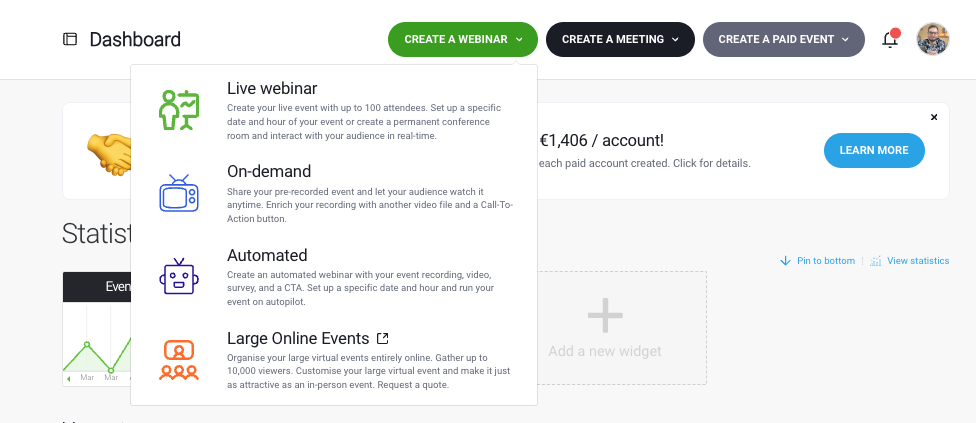
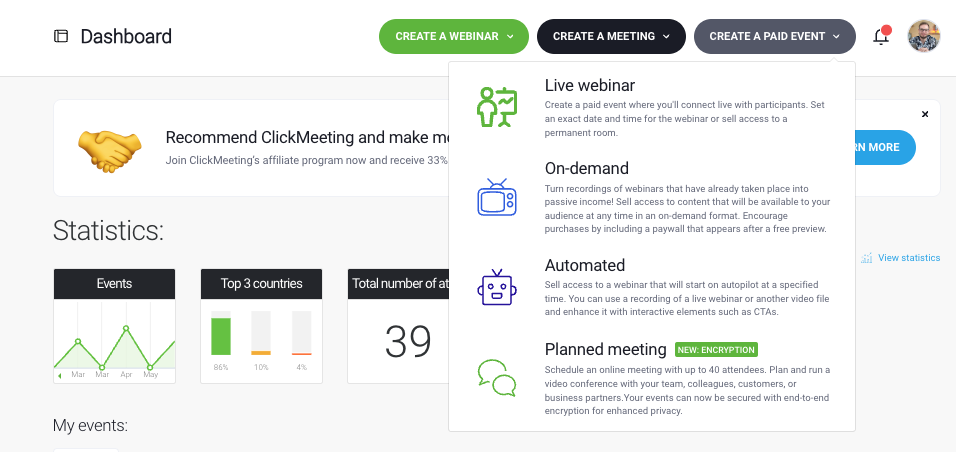
- Click “Create a webinar” Choose your webinar type: live, automated, on-demand, or paid. Give it a name that clearly communicates the topic.
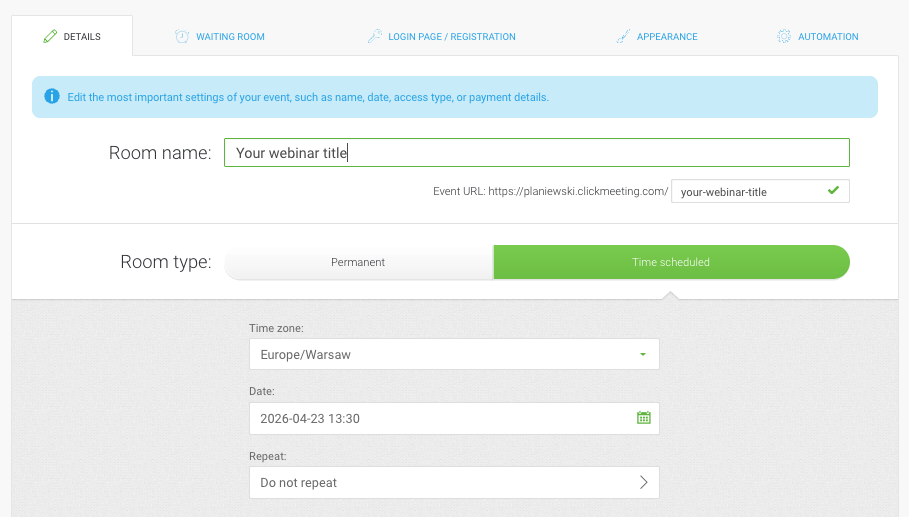
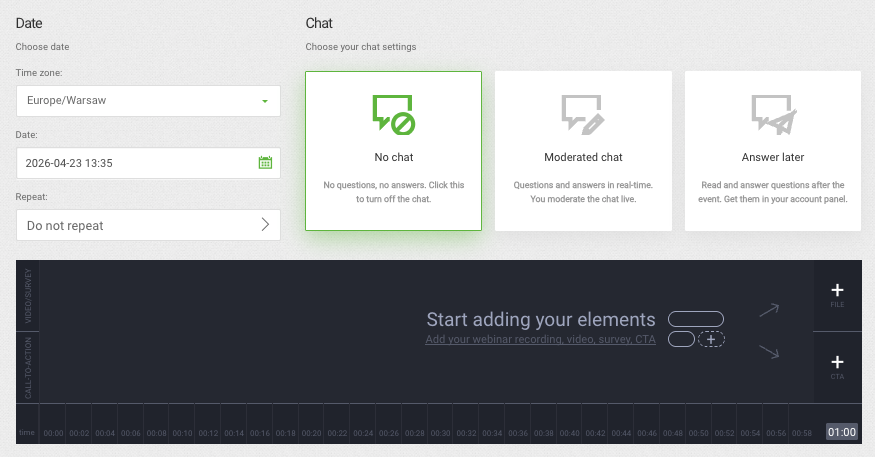
- Set the date and time. Pick the start time and time zone. ClickMeeting displays the correct local time for each attendee based on their location automatically.
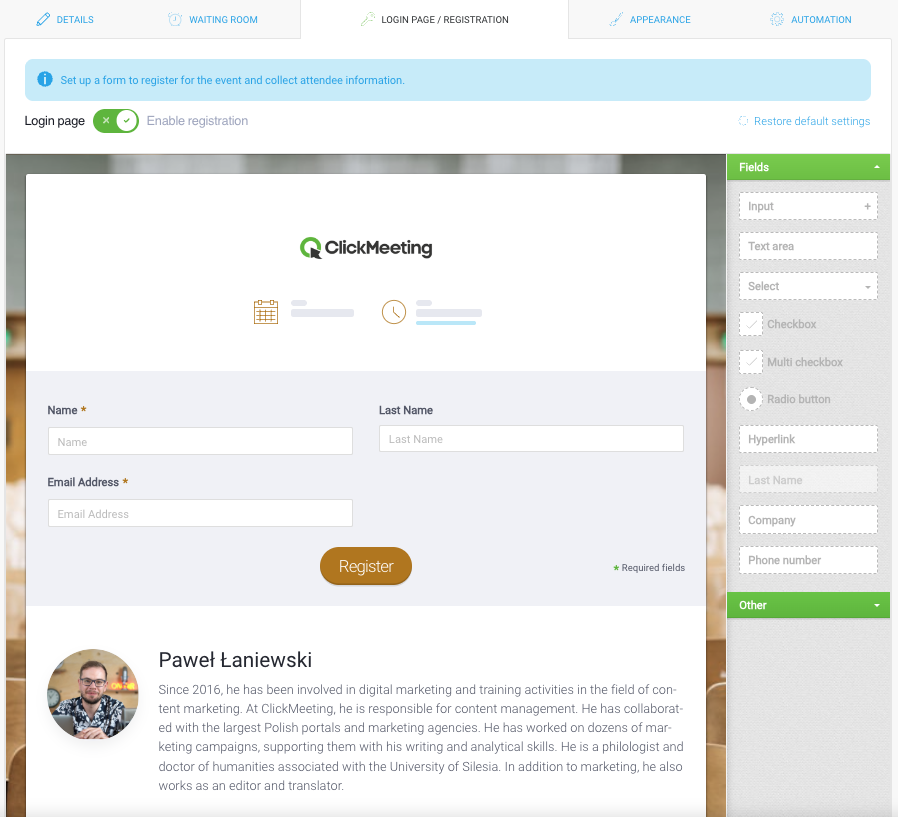
- Configure the registration form. Choose what information to collect — name, email, company, custom questions. Each registrant receives a unique join link after signing up.
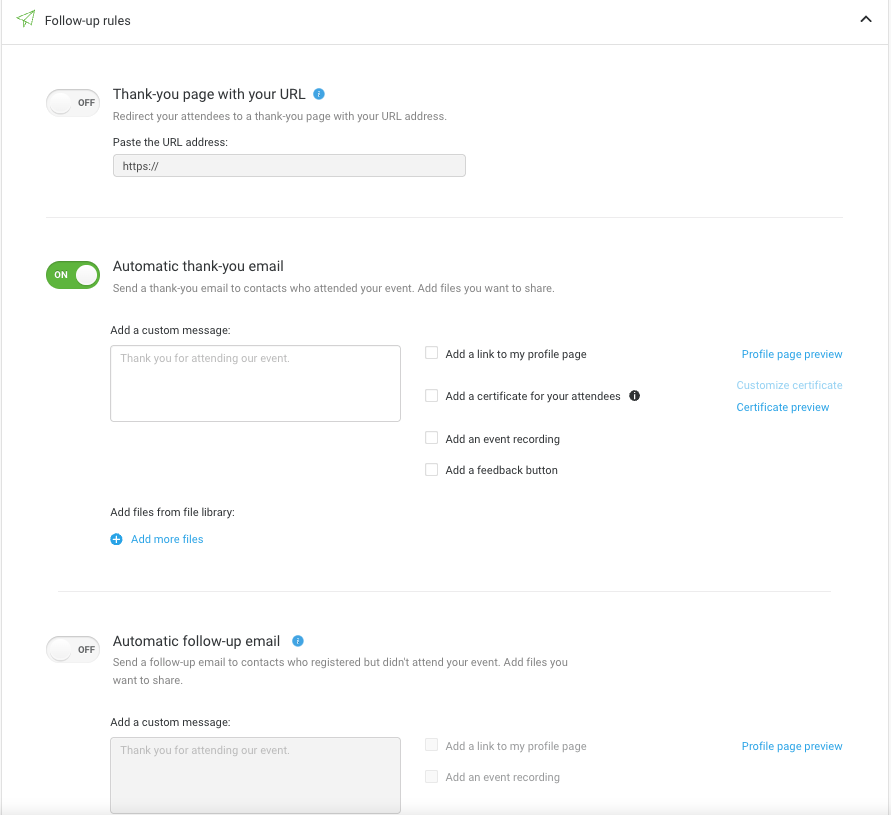
- Automate your communications. Set up an email invitation and a sequence of reminder emails. ClickMeeting handles the delivery automatically based on the schedule you set.
- Run a pre-webinar check. Upload your slides, practice screen sharing, check your video and audio, and check timing and flow for the full session at least one day before the event.
- Start the webinar and engage your audience. Use polls, a Q&A session, a virtual whiteboard, and interactive tools to let the audience participate actively — not just watch.
- Follow up within 24 hours. Send the webinar recording, a thank-you message, and a clear next step to everyone who registered — whether they attended or not.
Watch the walkthrough below to see how this looks inside ClickMeeting — from creating an account to starting your first live event:
|
Ready to host your first webinar? ClickMeeting gives you registration, reminders, recording, and follow-up — all in one browser-based platform. |
What should you do before the webinar?
Planning a webinar well before the day itself is what separates a smooth session from a stressful one. The pre-webinar phase covers three areas: choosing a topic that resonates with your audience, setting up the event technically, and promoting it so the right people show up. Get all three right, and the live event becomes the easy part.
How do you choose a compelling topic?
Your topic is the single biggest factor in whether people register and whether they stay. A compelling topic does one of three things: it solves a specific problem, teaches a skill with clear outcomes, or gives access to information that would otherwise take hours to find on one’s own. Generic topics — “Introduction to marketing” — rarely convert. Specific ones do: “How to generate 50 leads per month with webinars” tells the attendee exactly what they will walk away with.
When deciding on content and format, ask: who is my audience, what do they struggle with, and what can I show them in 60–90 minutes that genuinely improves their situation? The clearer your answer, the higher your attendance rates will be — registrants who understand the specific value do not forget to show up.
How do you set up your webinar page and send reminder emails?
Once your topic is locked, create the event in ClickMeeting and build your registration page — customise it with your branding, set the form fields you need, and activate the automated reminder sequence. Send reminder emails at least 48 hours before and again one hour before the start time — this two-touch sequence consistently lifts attendance rates compared to a single confirmation email.
For promotion, think beyond your email list. The fastest way to expand your reach without a paid budget is to invite guest speakers or a panelist whose own audience will see their social media posts and email invitation about the event. Add a registration banner to your website, publish three to five social media posts in the two weeks before the event, and ask any co-presenters to promote to their own lists. Quality of registrants matters more than volume — a smaller, well-targeted audience converts better after the webinar than a large but mismatched one.
How to host a lead gen webinar?
A lead generation webinar is a free event you offer in exchange for contact information. Every person who completes your webinar registration form gives you their name, email, and whatever additional data you configure — turning a single event into a pipeline of warm, qualified leads at a cost-per-lead that typically beats most paid advertising channels. The content of the webinar builds trust with those leads and moves them toward a purchase decision.
This model works because the barrier to entry is low while the intent signal is high. Someone who registers for a 90-minute webinar on your specific topic is telling you exactly what they care about — far more precisely than a generic contact form submission or a social media click ever could. For a full breakdown of how to build a lead generation strategy around this format, read our guide on how to use webinars in generating marketing and sales leads.
What makes a lead gen webinar convert well?
The structure of the webinar itself matters as much as the topic. Lead gen webinars typically follow a simple arc: open with the problem, teach the solution, and close with a clear call-to-action — use the ClickMeeting CTA button feature to display a clickable prompt at the exact moment your pitch lands hardest, not just in the follow-up email afterward.
Centrum Verte, a Polish HR and payroll training company, built its entire marketing engine around free webinars. Their weekly HR Wednesdays series generated over 81,000 leads in a single year — and their peak event drew 6,500 registrants, with more than 4,000 attending the live event. The webinar format, combined with ClickMeeting’s webinar registration and customer relationship management integrations, turned each free event into a direct pipeline for paid training sales. Connect ClickMeeting to HubSpot, Pipedrive, Keap, or your preferred CRM so new registrants land directly in your sales workflow without manual import.
How to host a paid webinar?
A paid webinar is an event where attendees purchase access before they can join. ClickMeeting supports payment processing through Stripe and PayPal directly inside the platform — no third-party checkout tool or custom code required, so you can start selling tickets within minutes of setting up the event. Set the price, connect your payment account, and the platform manages ticketing and delivers each attendee their unique join link after purchase.
The growth numbers in this category are significant and worth taking seriously. In Q1 2025, paid webinar ticket sales grew 24% year-over-year and total revenues grew 40% — the average revenue per paid event reached approximately €1,050, while the single top-performing event generated over €37,000. The most active paid webinar organiser on ClickMeeting earned over €350,000 in a single year. These results come from trainers, coaches, and consultants running events on a regular schedule — not large media companies with huge marketing budgets.
What are the best practices for a paid webinar?
Paid webinars require a stronger value proposition upfront than free events. Your registration page needs to make the case clearly: who this is for, what attendees will learn, why this presenter is worth paying to hear, and what specific outcome they will walk away with — testimonials, speaker credentials, and a clear agenda all help convert visitors into buyers.
- Price anchoring: offer early-bird pricing or a limited number of seats to create urgency without aggressive discounting.
- Discount codes: use them for partner promotions or re-engagement campaigns — ClickMeeting supports promo codes natively.
- Token-based access: tie each ticket to a specific attendee so access cannot be shared or transferred after purchase.
- Post-event upsell: offer the webinar recording to people who could not attend live — this turns a one-time event into ongoing passive revenue from your email list.
Shane Skwarek from S-FX.com has run paid webinars on ClickMeeting since 2012. 698 events, 24,735 unique attendees, and over $380,000 in revenue over a decade — all built on a simple model: 3–4 live webinars per month, run consistently, letting compounding audience growth do the work. “ClickMeeting is a highly reliable platform and a far more user-friendly alternative to the giants like Zoom or Microsoft Teams,” he says. “When clients try the platform, they love it.”
|
“ The most successful webinar hosts treat each event as one step in a longer journey — not a standalone broadcast. They design the registration page to qualify the right attendees, use the live session to build genuine trust, and let the automated follow-up sequence handle conversion. The hosts who add a well-timed CTA button during the webinar itself — not just in the follow-up email — consistently see stronger results. The webinar room is still the most underused sales and relationship-building environment most businesses have access to. Tomasz Bołcun, Brand Manager @ ClickMeeting |
|
Whether you’re running lead gen webinars, paid events, or automated sessions — ClickMeeting has the format and the tools to make each one work. |
How to host an automated webinar?
An automated webinar is a pre-recorded session that plays at a scheduled date and time without the host being present. You record the content once, upload it to ClickMeeting, and schedule it to run on any timetable you choose — the automated webinar timeline feature handles delivery, reminder emails, and post-event follow-up without any manual input from you. From the attendee’s perspective, it looks and feels like a live event: they register, receive reminders, join at the scheduled time, and can interact via chat.
This format is ideal for recurring training, product demos, or educational content that stays relevant over time. You can run the same webinar every Monday and Thursday without showing up — and because ClickMeeting supports multiple simultaneous instances, two attendees in different time zones can join the same webinar at their local preferred time without any scheduling conflict.
When does an automated webinar make more sense than a live one?
If your content does not change frequently and the value is in the information rather than real-time interaction, automation is the right call. A product walkthrough, an onboarding session, a software tutorial — these are ideal candidates because the questions attendees ask are predictable and the core content does not evolve week to week.
Before you schedule your automated webinar, run a complete pre-webinar review: check timing and flow, look for awkward transitions between slides, and verify that all interactive elements — polls, CTA buttons — fire at the right moments in the recording. One hour spent polishing the content saves you from attendees noticing a gap where a live presenter would have bridged a topic — unmuting to clarify mid-session is not possible in an automated format, so the recording itself must carry the full session.
How to host an on-demand webinar?
An on-demand webinar removes the scheduled time entirely. Instead of registering for a specific date and waiting, attendees sign up and get immediate access to the recorded content — they watch when it suits them, which dramatically reduces the friction between discovering your webinar and consuming it. The registration form still captures contact data, making on-demand webinars one of the most efficient formats for lead generation that runs continuously without intervention.
Read the full guide on how to create an on-demand webinar that works while you sleep for a complete setup and distribution walkthrough. The short version: treat your on-demand webinar like a high-value content asset — embed it in a blog post, link to it from your email list, promote it via social media — and it will generate leads for months after the original recording date.
How do you get the most out of an on-demand webinar?
The key to making an on-demand webinar perform long-term is pairing it with a distribution plan, not just uploading it and hoping people find it. ClickMeeting’s PayWall feature lets you offer a free preview before requiring webinar registration — this builds curiosity and qualifies intent before you ask for contact details, which typically improves both registration rates and lead quality.
- Link the on-demand webinar from related content on your website and in your email sequences to drive consistent traffic.
- Set up automated follow-up emails that trigger when someone completes the viewing — send additional resources, a relevant offer, or an invitation to a live Q&A session.
- Review analytics regularly: drop-off points in the recording reveal which sections lose attention and should be tightened in future versions.
How to host a masterclass — and why an online meeting might be the better choice?
A masterclass is a premium, knowledge-intensive session where a recognised expert teaches a small group in depth. The format emphasises quality of learning over quantity of attendees — and that distinction has a direct technical implication for how you should set it up inside ClickMeeting. Before choosing a webinar room, consider whether what you are running is a lecture or a workshop, because the two formats call for different platform configurations.
Most webinar formats limit audience participation by design: attendees watch, submit questions via chat, and interact through polls. That works at scale. But a masterclass typically involves 10 to 25 people where the value comes from dialogue, peer feedback, and direct interaction with the expert. In that context, ClickMeeting’s online meeting format outperforms a classic webinar — every participant can enable their camera and microphone without unmuting requests, and breakout rooms let you run group exercises within the same session. For a full breakdown of formats, pricing strategies, and promotion tactics, see the Online Masterclass Guide.
What does ClickMeeting’s online meeting format offer for a masterclass?
In a ClickMeeting online meeting, all participants can screen share, annotate on the virtual whiteboard, and contribute via video — making the session feel like a proper workshop rather than a broadcast. For groups up to 25 active participants, the meeting format is the right choice; for masterclasses that grow beyond that, ClickMeeting’s larger event formats scale to 10,000 participants while keeping production quality high.
Even for a small masterclass, configure a proper registration page and send reminder emails — it keeps the experience professional and makes attendance rates predictable. Record the session and offer the webinar recording as a participant bonus or as an upsell to people on your email list who could not attend the live event.
What should you do after your webinar?
The webinar ends. Most hosts close the browser and call it done. That is a mistake — what happens in the 24 hours after your webinar often determines whether the effort you invested in planning, promotion, and delivery translates into actual business results. The live event creates the relationship. The follow-up is where you decide whether to use it.
How do you turn webinar attendees into customers?
Start with the follow-up email, sent within 24 hours to everyone who registered — both attendees and no-shows. For attendees, include the webinar recording, any slides or additional resources mentioned during the session, and one clear next step; for no-shows, the same recording gives them a second chance to engage, and they often convert at a higher rate than you might expect once they finally watch the content.
Use ClickMeeting’s webinar statistics to segment your follow-up based on attendee behaviour. Someone who stayed for the full session and clicked the CTA button deserves a different message than someone who joined for 10 minutes and left — and pushing this engagement data directly into your CRM means your sales team knows exactly who to prioritise, without any manual data entry.
Do not let the recording sit unused after the follow-up email. A 90-minute webinar can become a blog post, a short-form clip for social media, or an on-demand lead magnet — one live event can generate weeks of related content if you approach it as a content production session, not just a broadcast. Invite attendees to future webinars: people who registered once are your warmest audience for the next event you host.
106 min
average duration of a webinar on ClickMeeting — if your content delivers value, attendees stay until the end (State of Online Events 2025)
Frequently Asked Questions
Here are the most common questions from people planning their first webinar or switching to a new platform.
What do I need to host a webinar?
You need a webinar platform, a computer with a camera and microphone, a stable internet connection, and a topic worth presenting. ClickMeeting is browser-based — neither you nor your attendees need to download anything to join a webinar. Most hosts are fully set up within 15 minutes of signing up for a free trial.
What is the difference between a webinar and an online meeting?
A webinar is a presentation to an audience — the host speaks and attendees interact via chat, polls, or a Q&A session. An online meeting is a two-way conversation where all participants can speak and screen share freely. In ClickMeeting, meetings and webinars are separate event types with different interaction models — for workshops and masterclasses with up to 25 active participants, the meeting format is usually the better choice.
How is ClickMeeting different from Zoom, Microsoft Teams, Webex, or Livestorm?
ClickMeeting was built specifically as a webinar platform — not a meeting tool that added webinar features afterward. It includes a full registration and automation system, paid webinar support with Stripe and PayPal, on-demand hosting, and European data storage that is GDPR-compliant by design. Zoom and Microsoft Teams are primarily meeting tools. Webex and Livestorm are closer competitors, but ClickMeeting offers more built-in monetisation features without requiring third-party integrations for ticketing or payment.
How do I improve attendance rates after people register?
Send reminder emails — at minimum 48 hours before and again one hour before the start time. ClickMeeting automates this entire sequence once you configure it in the event settings. A specific subject line (“Your webinar starts in 1 hour — here’s your join link”) consistently outperforms generic messages. Attendance rates also improve when the reminder clearly restates the specific value the attendee will get by showing up at the scheduled start time.
Can I charge for a webinar on ClickMeeting?
Yes. ClickMeeting supports paid webinars through Stripe and PayPal, with no custom code or third-party checkout page required. Set the price, connect your payment account, and ClickMeeting manages ticketing and delivers each attendee a unique join link after purchase. You can add discount codes, promo codes, and donation options. In Q1 2025, paid webinar revenues on ClickMeeting grew 40% year-over-year, with an average of 4,405 PLN per event.
What is an automated webinar and when should I use one?
An automated webinar is a pre-recorded session that plays on a set schedule without the host being present. Attendees register and receive reminder emails exactly as they would for a live webinar — the difference is that you only record the content once and ClickMeeting runs it automatically. Use the automated format for recurring training, product demos, or onboarding sessions where the content stays consistent and real-time interaction is not essential.
What is the difference between an automated and an on-demand webinar?
An automated webinar plays at a scheduled time — the attendee registers for a specific date and waits for the start time. An on-demand webinar has no scheduled time: the attendee registers and immediately receives access to the recording. On-demand webinars work best for evergreen content used as a long-term lead magnet, because there is no scheduling friction — someone discovers your webinar at 11pm and can start watching right away.
Can I invite a guest speaker or panelist to my webinar?
Yes. ClickMeeting lets you add additional presenters and a panelist to your webinar room — each receives their own presenter link, separate from the attendee join link. You can have up to 8 simultaneous camera streams active in a webinar room, which supports multi-presenter formats, panel discussions, and guest speaker sessions without technical issues or attendees needing to manage their own unmuting.
How do I handle technical issues during a live webinar?
Run a full pre-webinar check the day before: test your video and audio, practice screen sharing, check your internet speed, and confirm your slides display correctly in the webinar room. Prepare a backup plan for common issues — a phone hotspot if your main connection drops, a co-host who can manage the chat if you lose audio briefly. ClickMeeting’s support team is available during live events if you need real-time assistance.
How does ClickMeeting help you host a successful webinar from start to finish?
ClickMeeting covers every stage of the webinar lifecycle: registration pages, automated reminder emails, the live webinar room with polls, Q&A, screen sharing, and CTA buttons, webinar recording, and post-event follow-up sequences — all in a single browser-based platform. The 14-day free trial includes access to all core features, so you can create and host your first webinar and experience the full webinar experience before choosing a paid plan.
|
You now have the complete step-by-step guide — the next move is to schedule a webinar and see how it performs for your audience. |