

Think about your last live webinar. You spent three hours preparing, another hour setting up, presented for 90 minutes, and answered questions for 30 minutes afterward. Roughly six hours of work for one event. Now imagine if that same webinar could continue generating leads, sales, or educating customers 24/7, without you lifting a finger.
That’s the power of on-demand webinars. They’re your content working overtime, reaching people in different time zones, accommodating busy schedules, and building your business while you’re literally sleeping.
In this article, you’ll learn exactly how to create an on-demand webinar that delivers results—from the technical setup in ClickMeeting to the strategies that turn passive viewers into active customers.
Key Insights
Before we dive into the how-to, here’s what you need to know about on-demand webinars:
- On-demand webinars remove the scheduling barrier – 67% of people who register for live webinars never attend due to time conflicts. On-demand eliminates this problem entirely.
- Your content gains a longer shelf life – Instead of a one-time event, your webinar becomes an evergreen asset that continues delivering value for months or years.
- You can test and optimize continuously – Unlike live events where you get one shot, on-demand webinars let you refine your content, test different CTAs, and improve based on viewing patterns.
- Monetization becomes scalable – Whether you’re selling access or using webinars for lead generation, on-demand content scales without additional time investment.
- The setup is simpler than you think – With platforms like ClickMeeting, creating an on-demand webinar takes about 15 minutes, not hours.
Why On-Demand Webinars Make Sense Right Now
Remember when Netflix sent you DVDs in the mail? That shift from scheduled TV to on-demand entertainment changed everything. The same transformation is happening in business education and online events. 
Your potential customers and clients aren’t sitting at their desks at 2 PM on a Tuesday waiting for your webinar to start. They’re picking up kids from school, stuck in meetings, traveling for work, or simply living in a timezone where your “convenient” 2 PM is actually 2 AM for them.
Here’s a question: Have you ever wanted to attend a webinar but couldn’t make the scheduled time? Of course you have. Your audience faces the same problem.
The data tells the story clearly. Verte Training Center, one of ClickMeeting’s clients, discovered that offering on-demand access to their training content allowed them to serve 90% more students than live-only events. They went from conducting 20 training sessions per month to serving 50-60 parallel events, including on-demand options that people could access at their convenience.
But on-demand webinars aren’t just about convenience. They’re about building a content library that works for you constantly. Think of it as creating a digital sales team that never takes vacation, never gets tired, and can present your message perfectly every single time.
When Should You Use On-Demand Webinars?
On-demand webinars excel in specific scenarios. Understanding when to use them helps you maximize their impact.
Product Demonstrations and Tutorials
Does your product require explanation? Most software companies, service providers, and technical businesses struggle with this. Your prospects need to see your product in action before they’ll buy, but coordinating everyone’s schedule for a live demo is a nightmare.
An on-demand product demo solves this instantly. E Level, an educational platform working with ClickMeeting, uses on-demand webinars to showcase their course offerings. Prospective students can watch demonstrations of teaching methods, explore course content, and understand the learning experience—all without coordinating schedules or waiting for the next available slot.
Lead Generation Magnets
Want someone’s email address? Give them something valuable in return. On-demand webinars function as high-quality lead magnets because they offer substantial value without requiring time commitment synchronization.
Verte Training Center generated over 30,000 unique leads through their webinar series. While many started as live events, they repurposed the recordings as on-demand content, allowing interested professionals to access valuable HR and payroll information whenever it suited their schedule. Every single view meant another qualified lead in their database.
Educational Content and Training
If you’re in the education, training, or professional development space, on-demand webinars become your core content infrastructure.
The reason is simple: People learn at different speeds and different times. Some students want to binge-watch content on weekends. Others prefer 30-minute sessions during lunch breaks. On-demand accommodates all learning styles without you creating separate content for each preference.
Companies like Kwadrans Do Setki use on-demand webinars to scale their financial education programs. Rather than repeatedly presenting the same content live, they record once and allow unlimited access, reaching far more students with the same effort.
Sales Presentations and Pitches
Here’s something most sales teams won’t admit: Not every sales presentation is their best performance. Energy varies, questions disrupt flow, technical issues happen.
On-demand webinars let you record your absolute best sales pitch—the one where you nailed every point, answered objections perfectly, and delivered your call-to-action with precision. Then that perfect pitch becomes your standard presentation, working for you around the clock.
The Real Benefits (Beyond the Obvious Ones)
Everyone talks about time zones and convenience. Those are benefits, sure. But the real advantages of on-demand webinars go deeper.
You Can Finally Scale Your Expertise
Your knowledge is valuable. But as long as you’re the only one delivering it live, you’re trading time for money—and time is finite. On-demand webinars break this ceiling.
S-FX, a digital marketing agency, built a $380,000+ revenue stream by creating on-demand webinar content for their clients. They created the content once, then it worked continuously, generating income without requiring their physical presence for each viewing.
Your Content Gets Better Over Time
Live webinars are one-and-done. If you mess up a point, rush through a section, or forget to mention something crucial, that’s it. The event is over.
On-demand webinars are different. You record your content, review it, identify weak spots, and either re-record problematic sections or add supplementary materials. Your version 2.0 is better than version 1.0, and version 3.0 improves on both.
Viewing Behavior Tells You What Works
When someone watches an on-demand webinar, the platform tracks their behavior. How long did they watch? Where did they pause or rewind? When did they drop off?
This data is gold. It tells you exactly which parts of your content resonate and which parts bore people. You can’t get this level of insight from a live event where everyone politely sits through your entire presentation.
ClickMeeting’s analytics show you these patterns clearly, letting you optimize your content based on actual viewer behavior rather than guesses.
Passive Viewing Becomes Active Engagement
This seems counterintuitive, but it’s true. On-demand webinars often generate more meaningful engagement than live events.
Why? Because viewers can pause, take notes, implement what they learn, and come back to continue. They control the pace, which leads to better comprehension and higher likelihood of taking action on your calls-to-action.
How to Create an On-Demand Webinar in ClickMeeting
Let’s get specific. Here’s exactly how to set up an on-demand webinar in ClickMeeting, step by step. You’ll have this running in about 15 minutes.
Step 1: Create Your Webinar Room
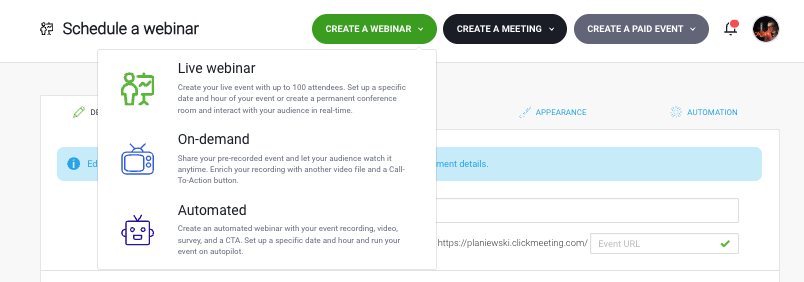
Log into your ClickMeeting account. At the top of your dashboard, you’ll see a “Create webinar” button. Click it.
You’ll see a dropdown menu with several options. Select “On-demand webinar” from the list. This tells ClickMeeting you’re creating content people can access anytime, not a scheduled live event.
Step 2: Configure Basic Settings
Now you’ll fill in the fundamental details of your webinar:
Room name: This is your webinar title. Make it clear and specific. “Product Training” is vague. “How to Set Up Your CRM in 30 Minutes” tells people exactly what they’re getting.
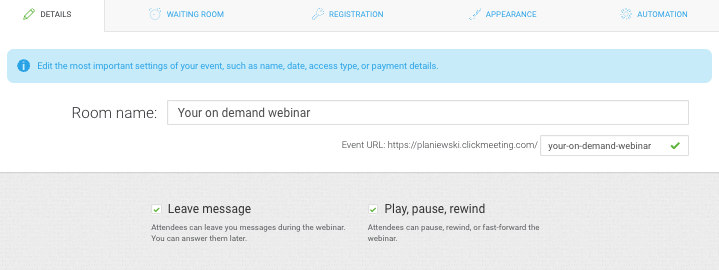
Leave message option: Decide whether to enable this feature. When activated, attendees can leave you messages during the webinar. You see these later and can respond. This is particularly useful if you’re using the webinar for customer support or ongoing dialogue.
Play/pause/rewind controls: This is crucial. Do you want viewers controlling playback, or do you want them to watch linearly? Most on-demand webinars benefit from giving viewers full control—it increases completion rates because people can rewatch sections they didn’t fully understand.
Think about it like this: If your webinar is educational or instructional, full playback control is essential. If it’s a sales presentation where you want to control the narrative flow, you might limit these controls.
Step 3: Upload Your Content
This is where your webinar comes to life. Click on the timeline section in ClickMeeting.
You have two main options for adding content:
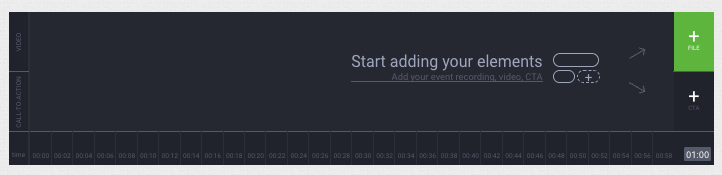
Option 1: Use a recording from your ClickMeeting account
If you’ve previously hosted a live webinar on ClickMeeting and recorded it (pro tip: always record your webinars), you can select that recording directly. ClickMeeting pulls it from your account, and you’re done. This is the fastest method.
One caution here: Review your live recording before using it for on-demand. Sometimes live events have technical hiccups, long pauses, or off-topic tangents that you’ll want to edit out. If your recording has these issues, export it, clean it up in video editing software, then upload the polished version.
Option 2: Upload a file from your computer
Got a video file ready? Click “Upload” and select your video from your hard drive. ClickMeeting accepts most common video formats.
This is where you have creative freedom. Your “webinar” doesn’t have to be a simple recording of someone talking. You can upload:
- A professionally edited video with graphics, transitions, and multiple camera angles
- A screen recording walking through your product or service
- A combination of presentation slides with voiceover
- Interview-style content with multiple speakers
The platform doesn’t care about your format—it just needs a video file.
Step 4: Set Access Options
Now you decide who can view your on-demand webinar and how they access it. ClickMeeting gives you four options:
Open access: Anyone with the link can watch. No registration, no barriers. This works well if you’re maximizing reach and collecting leads through other methods.
Password protected: Viewers need a password to access the content. You could use this for exclusive content given to customers, or for premium material you share selectively.
One-time token: ClickMeeting generates a unique access token for each viewer. They can watch once with their token, then it expires. This option works great for paid content or when you want to control distribution carefully.
Paid access: This is where on-demand webinars get really interesting. More on this in the next section.
For basic lead generation, you’ll typically choose open access with a registration form. This captures viewer information while removing barriers to entry.
Step 5: Customize Your Registration and Viewing Experience
Before you launch, spend a few minutes making your webinar look professional. ClickMeeting lets you customize several elements:
- Registration page: Add your logo, brand colors, and a compelling description of what viewers will learn
- Waiting room: Create anticipation with preview content or testimonials
- Webinar room: Customize the player interface to match your brand
- Thank you page: What happens after someone finishes watching? Direct them to your next step
These customizations take minutes but significantly impact conversion rates. A polished, branded experience builds trust and credibility.
Step 6: Launch
Click “Done” and your on-demand webinar is live. ClickMeeting generates a unique URL you can share anywhere—in emails, on social media, embedded on your website, or included in online advertising.
Unlike live webinars where you need to coordinate schedules and send reminders, your on-demand webinar just… exists. It’s always available. Always ready. Always presenting your message perfectly.
The biggest mistake people make with on-demand webinars is treating them like uploaded videos. They’re not. An on-demand webinar is a strategic tool that should integrate with your entire marketing and sales ecosystem. Think about registration forms, follow-up sequences, viewing behavior tracking, and conversion paths. When you set it up properly from the start, an on-demand webinar becomes one of your most valuable marketing assets.
Brand Manager @ ClickMeeting
Why Paid On-Demand Webinars Are Worth Your Attention
Now we’re getting to the interesting part. You can actually charge people to watch your on-demand webinars, and it’s simpler than you think.
The market for paid online content has exploded. According to ClickMeeting’s “Paid Webinars in Poland Q1 2025” report, 72% of people who purchased access to webinars rated the experience positively and would buy again. The barrier to paid online education has effectively disappeared.
But why would someone pay for webinar access when so much free content exists online? Several reasons:
Quality and specificity: Free content is often general. Paid content delivers specific, actionable solutions to particular problems. If you’re solving a $10,000 problem, charging $97 for the solution is a bargain.
Commitment through payment: People who pay attention differently than those who get something free. Paid attendees complete more content, implement more recommendations, and achieve better results—which means better testimonials and word-of-mouth for you.
Exclusive access: Sometimes the value isn’t just in the content but in the exclusivity. Being part of a paid community or getting first access to new strategies creates perceived value beyond the information itself.
Real Examples of Successful Paid On-Demand Webinars
Kwadrans Do Setki created a series of paid on-demand webinars teaching financial strategies. Their approach was simple: Record high-quality content once, price it reasonably, and let it sell continuously. The result? A consistent revenue stream that required no ongoing time investment.
Verte Training Center transformed their live training sessions into paid on-demand content, serving 50-60 parallel training sessions per month. Many of these generate revenue continuously without requiring trainers to present live each time.
The common thread? These businesses created valuable content once, then monetized it repeatedly.
Setting Up Paid On-Demand Webinars in ClickMeeting
Ready to monetize your expertise? Here’s how to configure paid access for your on-demand webinars.
Step 1: Integrate Your Payment System
Before you can charge for access, you need to connect ClickMeeting to a payment processor. ClickMeeting integrates with three major systems:
- Stripe: Popular for its clean interface and low fees. Works in most countries.
- PayPal: Recognized globally, trusted by consumers, especially useful if you’re selling internationally.
- PayU: Strong in European markets, particularly Poland and neighboring countries.
Choose the processor that works best for your audience and location. The integration process takes about five minutes:
- Go to your ClickMeeting account settings
- Navigate to the payment integrations section
- Select your preferred processor
- Follow the authentication prompts to connect your account
- Done
Once connected, ClickMeeting handles all payment processing automatically. Money goes directly to your payment processor account, minus the processor’s fees.
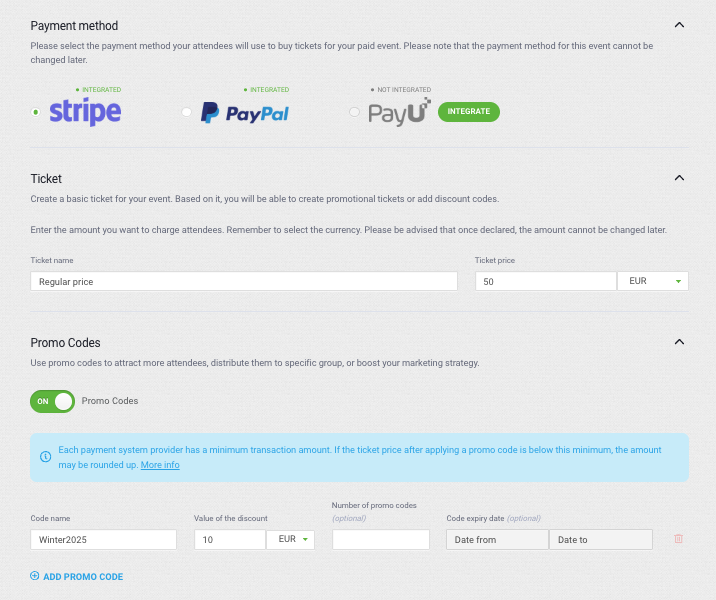
Step 2: Set Your Price
In the same window where you configured your on-demand webinar, look for the access options. Select “Paid access.”
You’ll see a field where you enter your price. How much should you charge?
Consider these factors:
Length and depth of content: A 30-minute introduction might be worth $27-$47. A comprehensive 2-hour training could command $97-$297.
Alternative costs: If learning the same information would require a $2,000 course or hiring a $5,000 consultant, even a $497 webinar seems like a bargain.
Your audience: B2B professional audiences typically have higher price tolerance than B2C consumer audiences.
Market testing: Start with one price, measure conversion rates, and adjust. Sometimes lowering your price increases volume enough to boost total revenue. Other times, raising prices increases perceived value and conversions.
Don’t underprice based on fear. A common mistake is charging $9.99 because it seems “safe.” If your content solves a real problem, people will pay real money for the solution.
Step 3: Create Promotional Codes
This is where paid on-demand webinars get strategic. ClickMeeting lets you set up promotional codes and discounts directly in the platform.
Why use promo codes?
Launch promotions: Offer early-bird pricing to build initial momentum. “First 100 buyers get 40% off” creates urgency.
Email list incentives: Give your existing subscribers an exclusive discount code. This rewards loyalty and boosts conversion rates.
Partnership opportunities: If you’re collaborating with influencers, affiliates, or complementary businesses, give them unique promo codes to share with their audiences. You track conversions and can offer commission splits.
Upsell opportunities: Someone bought your introductory webinar for $47? Send them a 25% off code for your advanced training at $197.
Abandoned cart recovery: If someone starts the purchase process but doesn’t complete it, send them a discount code to encourage completion.
Setting up promo codes in ClickMeeting is straightforward:
- In your webinar settings, find the “Promo Codes” section
- Click “Add New Code”
- Enter the code name (make it memorable: “LAUNCH2025” not “XJ8K2M”)
- Set the discount amount or percentage
- Optionally set an expiration date or usage limit
- Save
The system automatically applies the discount when someone enters the code during checkout.
Step 4: Monitor and Optimize
Once your paid on-demand webinar is live, watch the numbers. ClickMeeting’s analytics dashboard shows you:
- How many people visit your registration/purchase page
- What percentage completes the purchase
- Where viewers drop off if they don’t complete
- Viewing patterns after purchase
- Revenue over time
Use this data to improve. If 50% of people abandon at the payment screen, maybe your price is too high or the value proposition isn’t clear enough. If people are buying but only watching 10 minutes of a 60-minute webinar, your content isn’t engaging enough.
The beauty of paid on-demand webinars is you can continuously refine them. You’re not locked into one recorded version forever.
Tips for Maximizing On-Demand Webinar Success
Creating the webinar is just the beginning. These strategies help you get more value from your on-demand content:
Split Your Content Into Series
Instead of one 90-minute webinar, consider creating three 30-minute webinars in a series. Why?
- Easier for viewers to commit to watching
- Multiple opportunities to capture leads
- Ability to charge for each part or offer package deals
- Better viewing completion rates
Think of it like a Netflix series versus a three-hour movie. Both tell a story, but one format keeps viewers more engaged.
Gate Your Content Strategically
Not every webinar needs to be completely open or completely behind a paywall. Consider hybrid approaches:
The first module is free: Let people watch the first 20 minutes to understand your teaching style and the value you deliver. Then gate the rest behind a registration or payment.
Free with lead capture: Make the content free, but require email registration. You’re trading the content for contact information—a fair exchange that builds your list.
Tiered access: Offer a basic version free, a comprehensive version for a moderate price, and a premium version with additional resources at a higher price point.
Repurpose Aggressively
Your on-demand webinar isn’t just a webinar. It’s raw material for multiple content pieces:
- Pull out key quotes and create social media posts
- Extract the audio and turn it into a podcast episode
- Transcribe the content and create a detailed blog post or ebook
- Identify the best 60 seconds and create short-form video clips for Instagram or TikTok
- Use screenshots and key points to create an infographic
Every time you repurpose content, you’re amplifying your investment in creating the original webinar.
Automate Follow-Up Sequences
ClickMeeting integrates with email marketing platforms through Zapier. Set up automated sequences that trigger based on webinar behavior:
- Someone registers but doesn’t watch? Send a reminder email.
- Someone watches 100% of the content? Send them a special offer for your next-level product.
- Someone watches only 30%? Send them a survey asking why they didn’t finish.
- Someone completes a paid webinar? Deliver bonus materials or offer a discount on related products.
This automation turns your passive on-demand webinar into an active sales and marketing system.
Use Analytics to Improve Your Content
Most people create a webinar and forget about it. Smart marketers use viewing data to continuously improve.
Where do people drop off? That section probably needs to be shortened, clarified, or removed entirely.
Where do people rewind and rewatch? That’s your strongest content—consider expanding on that topic or creating follow-up content.
What’s the average view duration? If people are only watching 40% of your 60-minute webinar, that’s feedback. Either the content loses steam, or 60 minutes is too long for your audience.
Common Mistakes to Avoid
Let’s talk about what doesn’t work, so you don’t waste time on these approaches.
Mistake #1: Recording Your First Take and Calling It Done
Your first recording is rarely your best. You’ll forget to mention important points. You’ll stumble over words. Your pacing might be off.
Record once, review it honestly, then decide if you need to record again or edit what you have. The difference between an average on-demand webinar and an excellent one often comes down to this second look.
Mistake #2: Ignoring Audio Quality
People will tolerate mediocre video. They won’t tolerate bad audio.
If viewers strain to hear you, battle background noise, or deal with echo, they’ll leave. Invest in a decent microphone. Record in a quiet space. Test your audio before the full recording.
Mistake #3: Making It Too Long
Live webinars often run 60-90 minutes because you’re interacting in real-time, answering questions, and maintaining engagement through live presence.
On-demand webinars need to be tighter. Aim for 30-45 minutes of pure value. Cut the fluff. Trim the tangents. Make every minute count.
Mistake #4: Weak Call-to-Action
What should viewers do after watching? If you don’t tell them clearly, they’ll do nothing.
Your on-demand webinar needs a strong, specific call-to-action. “Visit our website” is weak. “Click the button below to schedule your free strategy call” is specific. “Use code WEBINAR2025 for 30% off your first month” removes friction.
Test different CTAs to see what converts best.
Mistake #5: Creating Once and Never Updating
Markets change. Your product evolves. Competitors emerge. Best practices shift.
Review your on-demand webinars every 6-12 months. Update outdated information. Add new insights. Refresh examples. This keeps your content relevant and valuable.
Frequently Asked Questions
How long should my on-demand webinar be? Aim for 30-45 minutes for most business topics. Shorter webinars (20-30 minutes) work well for product demos or specific technique tutorials. Longer format (60+ minutes) can work for comprehensive training, but break it into clearly marked sections so viewers can navigate easily.
Do I need expensive equipment to create an on-demand webinar? No. A decent webcam (built-in laptop cameras often suffice), a USB microphone ($50-100), and good lighting (natural light or inexpensive LED panels) create professional-quality results. Your content quality matters more than production value.
Can I edit my webinar after uploading it to ClickMeeting? Once uploaded, you can’t edit within ClickMeeting itself. Make your edits before uploading. Export your recording, edit it in video software (many free options exist), then upload the final version. This is why reviewing content before publishing is crucial.
How do I know what to charge for a paid on-demand webinar? Start by calculating the value you deliver. If your webinar teaches a skill that could earn someone an extra $5,000 annually, charging $97-297 is reasonable. Research competitor pricing, consider your audience’s budget, and test different price points to find what converts best.
Can I offer both free and paid on-demand webinars? Absolutely, and you should. Use free webinars as lead magnets or introductory content, then promote paid webinars as your next-level offering. This creates a natural funnel where free content builds trust, and paid content delivers deeper value.
What if someone records my paid webinar and shares it? This is a risk with any digital content. Minimize it by adding watermarks, including personalized elements (like greeting buyers by name), and using ClickMeeting’s one-time token access. Focus your energy on delivering so much value that people want to buy directly from you for updates and support.
How many on-demand webinars should I create? Start with one excellent webinar rather than five mediocre ones. Once it’s generating results, create a second one that builds on the first or addresses a related topic. Grow your library strategically based on what your audience responds to.
Can I reuse my live webinar recording as on-demand content? Yes, but edit it first. Remove long pauses, technical difficulties, and off-topic chat discussions. Clean up the audio. Add an introduction and conclusion if they’re missing. The goal is creating a polished experience, not just republishing a raw recording.
How do I drive traffic to my on-demand webinar? Use the same channels that work for any content: email marketing to your list, social media promotion, paid advertising (Facebook/Instagram ads, Google Ads), SEO-optimized blog posts linking to the webinar, partnerships with influencers, and appearing as a guest on podcasts or other people’s content.
What’s the difference between an on-demand webinar and a pre-recorded video on YouTube? The structure and intent. On-demand webinars typically include registration (for lead capture), are focused on a specific learning outcome or sales goal, include strategic calls-to-action, and often exist behind a soft or hard paywall. YouTube videos are generally about reach and views. Both use video, but they serve different purposes