
Online education has never been more in demand — and neither has the technology that powers it. Whether you’re a university lecturer moving classes online, a corporate trainer delivering virtual training to distributed teams, or a tutor running live online courses for private students, choosing the right virtual classroom software shapes everything: how engaged your learners are, how smoothly sessions run, and whether the learning experience holds up compared to a physical classroom.
|
📌 Key Insights
|
What Is Virtual Classroom Software — and How Is It Different from Video Conferencing?
It’s a question worth answering clearly, because the distinction matters when you’re choosing the right tool. Virtual classroom software is specifically designed to replicate the teaching and learning dynamic of a physical classroom in an online environment. It does more than connect people on a video call — it gives teachers and learners a structured, interactive space with the classroom tools they actually need: digital whiteboards, real-time polls, breakout rooms for group work, screen share for demonstrations, class recording for review, and controls that allow the instructor to manage the virtual class the way they’d manage a room in person.
Generic video conferencing platforms, by contrast, are built for meetings — not for teaching. You can use them to deliver online classes, but you’ll quickly notice what’s missing. No collaborative whiteboard. No easy way to divide learners into small groups. No polling tools designed for formative assessment. No learning environment structure that puts the instructor in clear control.
This is the core of the virtual classrooms vs general video conferencing debate. For online tutoring, online training, or live online courses, a purpose-built virtual classroom makes the experience meaningfully better — for the teacher and for every learner in the session. The rest of this article will help you find the right one.
How to Choose the Right Virtual Classroom Software?
Choosing the best virtual classroom platforms is genuinely difficult — there are dozens of software solutions available, each with different strengths, pricing structures, and use cases. Rather than listing every option and leaving you to work it out, here’s a simple framework. Answer these three questions honestly before you evaluate any specific platform, and you’ll narrow your list considerably.
What Virtual Classroom Features Do You Actually Need?
Start with a feature list. Not a wishlist — a genuine assessment of what your teaching requires. Do you need live virtual sessions, or are your learners primarily accessing content on demand? Will you use a whiteboard regularly, the way a chemistry teacher writes equations on a board and asks students to complete them in real-time? Do you need breakout rooms to split a large group of 100 students into smaller collaborative clusters for group exercises? Is screen share essential for demonstrating software or walking through a process step by step?
Separate must-haves from nice-to-haves. A tutor running one-to-one online tutoring sessions has very different requirements from a university lecturer hosting a virtual class of 200. A corporate trainer delivering online training to a distributed team needs different classroom tools than a language teacher running online classes for beginners. The clearer you are on what the learning experience needs to deliver, the easier the platform selection becomes.
What’s Your Budget — and Is There a Free Plan or Free Trial?
Virtual classroom software ranges from free open-source LMS platforms to enterprise-priced conferencing tools that cost thousands per year. Before you fall in love with a platform’s feature set, make sure the pricing is realistic for your situation. Many of the best platforms offer a free trial so you can test the full feature set before committing — if a platform doesn’t offer this, treat it as a yellow flag. Quality software solutions tend to have enough confidence in their product to let you try before you buy.
ClickMeeting, for example, offers a free trial with access to the platform’s full feature set — no credit card required. There’s no free plan with permanently limited features; instead, you get a genuine trial period to run real sessions and assess whether the platform works for your teaching context.
How Important Is Ease of Use for Your Learners?
This question is underrated. A platform might have every feature you need — but if it takes 20 minutes of setup for each learner to join a session, or if the interface is confusing enough that students online spend the first 10 minutes troubleshooting instead of learning, the learning outcomes suffer regardless of how good the content is. Ease of use matters on both sides of the screen: for the teacher building and running sessions, and for every learner joining them.
The best virtual classroom software finds the balance between being feature-rich and being immediately accessible. Ask for a demo, run the free trial with a real group, and pay attention to how much friction there is for first-time users. That friction is what you’ll be managing every session.
|
ClickMeeting is a purpose-built virtual classroom platform used by universities, corporate trainers, and independent tutors worldwide. Try it free — no credit card needed. |
Virtual Classrooms vs LMS Platforms: What Are The Differences?
Before comparing specific tools, it helps to understand that virtual classroom software and LMS (Learning Management System) platforms solve different problems — and many educators need both.
An LMS is primarily built for managing online courses: organising content, tracking learner progress, distributing assignments, and storing course materials. Major learning management systems like Moodle, Schoology, and Google Classroom are excellent at this. But most LMS platforms are not built for live, real-time teaching. They typically don’t include the interactive virtual classroom features teachers need for live sessions — which is why they either integrate with a separate conferencing tool or, in some cases like Schoology, rely on BigBlueButton as a built-in video option.
A virtual classroom platform like ClickMeeting, by contrast, focuses on live interaction — real-time audio and video, collaborative whiteboards, breakout rooms, polls, screen share — while also supporting on-demand and automated session formats. The two approaches complement each other, which is why platforms like ClickMeeting integrate directly with Moodle: you get the course management capabilities of the LMS combined with the live teaching environment of a dedicated virtual classroom platform.
AGH University of Science and Technology in Kraków is a good example of this in practice. The university has been running virtual classrooms with ClickMeeting integrated into their Moodle-based platform since 2016. Lecturers use the LMS for course organisation and materials, and ClickMeeting for live sessions — virtual classes of up to 50 or 200 students, with password-protected rooms and the full range of teaching and learning features available to every instructor.
A Comparison of Popular Virtual Classroom Software Options
With the framework in place, here’s how some of the most widely used virtual learning platforms compare — and where each fits best.
Blackboard Collaborate
Blackboard Collaborate is a well-established virtual classroom platform designed primarily for higher education. It handles live online classes reliably, supports class recording, and includes the interactive tools university lecturers typically need. The platform is deeply embedded in the higher education ecosystem and integrates with Blackboard’s broader LMS environment.
The main limitation is cost and scope. Blackboard Collaborate is priced for institutional use, which makes it impractical for independent tutors, corporate trainers, or smaller online education providers. If you’re a college or university already using the Blackboard ecosystem, it’s a reasonable choice — but for most other contexts, the price-to-value ratio doesn’t hold up against more flexible virtual classroom software options.
Schoology
Schoology is a popular LMS designed for K-12 education, and it does a good job of organising coursework, communicating with parents, and supporting teachers and students through the full lifecycle of a school course. Its social-media-style interface makes it relatively approachable for younger learners, and its student analytics are genuinely useful for teachers tracking progress across a class.
The significant gap is that Schoology’s live video conferencing capability comes via integration with BigBlueButton rather than as a native, seamless experience. For schools that want a virtual class environment designed specifically for live teaching online — rather than a conferencing tool bolted onto a course management system — this is a meaningful limitation. Managing online courses through Schoology works well; hosting engaging live virtual classroom sessions requires a separate setup.
Moodle
Moodle is one of the world’s most widely used LMS platforms, and its open-source nature gives institutions and educators considerable flexibility in how they configure and extend it. Teachers can upload course materials, manage assignments, distribute grades, and communicate with learners through a modular block-based interface. The free plan makes it accessible even for smaller organisations or individual educators.
Like Schoology, Moodle doesn’t include native live video conferencing — which means educators rely on virtual classroom software integrated into the platform for live sessions. ClickMeeting’s Moodle integration is used by institutions worldwide for exactly this reason: it brings real-time video, whiteboards, breakout rooms, and polls into the Moodle environment with minimal friction. At AGH University, this integration allows instructors to launch live sessions directly from their Moodle dashboard, with students accessing them through the same system they use for all other course materials.
|
“ What makes the virtual learning experience work is the same thing that makes any learning experience work: the learner has to feel genuinely involved. You can’t achieve that with a static video broadcast. The tools that move the needle are the ones that create real-time interaction — a well-placed poll that checks comprehension before moving on, a whiteboard that the instructor and learner build together, breakout rooms that give students space to discuss before bringing insights back to the group. At ClickMeeting, we built these tools specifically for the teaching context, not as afterthoughts to a conferencing product. Tomasz Bołcun, Brand Manager @ ClickMeeting |
Why ClickMeeting Is the Best Virtual Classroom Software for Live Online Teaching?
ClickMeeting is classroom software designed from the ground up for educators who need live, interactive virtual classrooms — not a repurposed conferencing tool with a few extra buttons. It’s used by universities, corporate training teams, independent tutors, and online education platforms across Europe and beyond. Here’s what makes it stand out as the top virtual classroom choice for live teaching.
The platform’s virtual classroom features cover everything teachers and students need for an engaging online experience:
- Digital whiteboards. Multiple interactive whiteboards let instructors write equations, annotate diagrams, and work through problems in real-time — exactly as they would on a board in a physical classroom. At AGH University, chemistry lecturers use ClickMeeting’s whiteboard to leave equations incomplete and ask students to solve them in the chat window, turning passive viewing into active participation. The online whiteboard is also fully collaborative, meaning learners can contribute directly during the session.
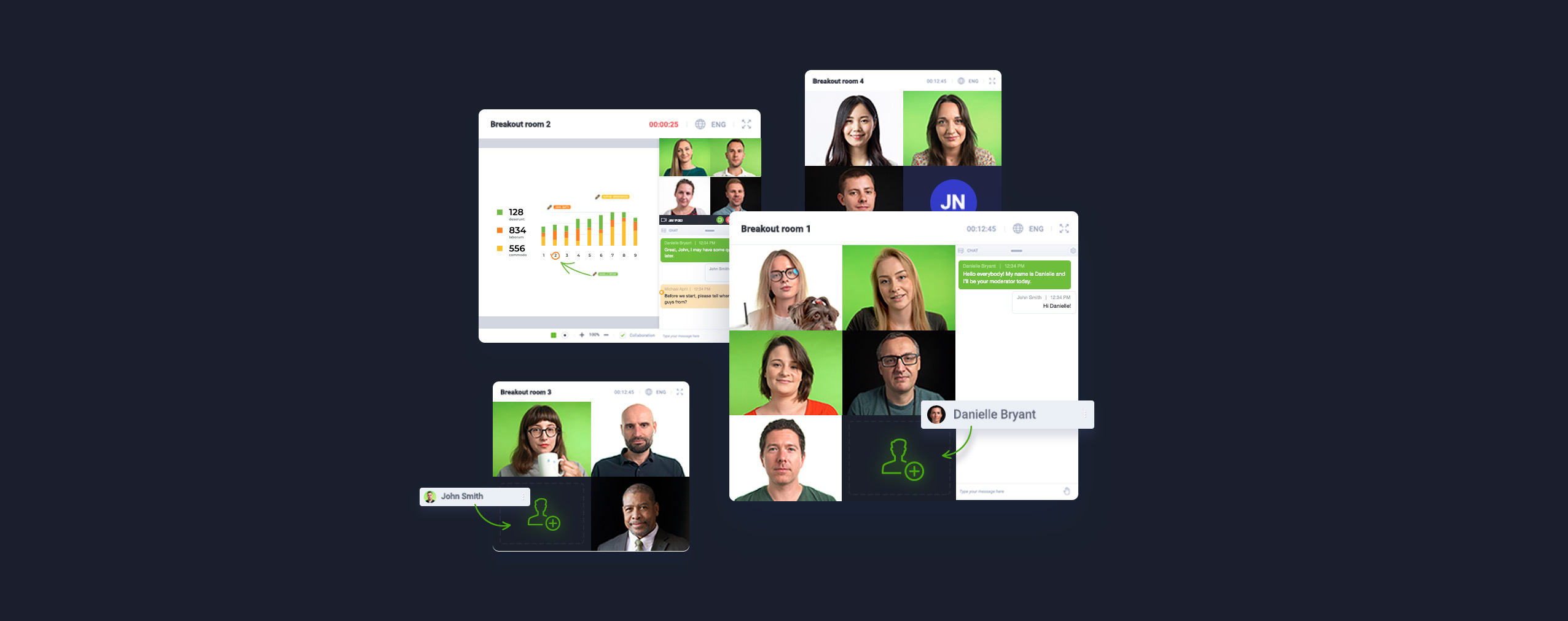
- Breakout rooms. Need to divide a large class into smaller groups for discussion or group work? Breakout rooms let you split learners into focused sub-sessions — with the instructor able to move between rooms and monitor progress. AGH’s Dr Piotr Chyła uses breakout rooms during exams to monitor separate groups simultaneously, and during regular classes to give students focused time on specific tasks before bringing them back to the main virtual class.
- Real-time polls. A well-timed poll changes the energy of a virtual class immediately. Use a poll at the start of a session to assess prior knowledge, mid-session to check comprehension, or at the end to gather feedback. Each poll result is displayed instantly to the whole group — which creates a shared moment of reflection that’s impossible to replicate in a passive online learning format. Polls take seconds to launch and are one of the most consistently effective engagement tools in any virtual classroom platform.
- Screen share. The most direct way to teach a process is to show it. ClickMeeting’s screen share lets instructors share their full screen, a specific application window, or a browser tab — with no lag and no quality loss. Use screen share to walk through software step by step, demonstrate a workflow, review a document collaboratively, or guide learners through a process they’ll need to replicate themselves. Multiple presenters can be granted screen share rights, making truly collaborative teaching sessions possible.
- Class recording. Every session can be recorded automatically and made available to learners who couldn’t attend live, or to those who want to review the material at their own pace. Class recording is essential for online learning contexts where attendance varies, or where learners are in different time zones. Recorded sessions can also be repurposed as on-demand course materials — extending the value of every live session well beyond the day it was delivered.
- Custom branding and virtual environment design. Customize your virtual classroom with your institution’s or company’s branding — logos, colours, and visual identity. For corporate online training, this reinforces brand consistency. For educational institutions, it creates a coherent virtual learning environment that feels intentional rather than generic.
- Security and access controls. Password-protected sessions, the ability to lock virtual classrooms, and GDPR-compliant data handling ensure that every session is secure. The platform’s data is hosted on European servers — a meaningful consideration for European educational institutions and any organisation that takes data compliance seriously.
- LMS integration. ClickMeeting integrates directly with Moodle and other major learning management systems, allowing educators to use virtual classroom software for online teaching within the LMS environment their learners already use. This reduces friction for students online and eliminates the need to manage two completely separate systems.
E Level, an online education company that runs live virtual career education sessions using ClickMeeting, sees over 85% of learners actively interacting during every session — with sessions regularly attracting 300 to 600 attendees. Their attendance rate sits consistently between 60 and 65%. These aren’t numbers you achieve with a generic video conferencing tool. They’re what happens when you use virtual classroom software built for engagement, run by educators who understand how to use it.
|
Make your virtual classroom a place learners actually want to be. ClickMeeting gives you whiteboards, breakout rooms, polls, screen share, and class recording — in one platform built for teaching online. |
Frequently Asked Questions
Here are answers to the most common questions about virtual classroom software and choosing the right virtual classroom platform for online education.
What is the difference between virtual classrooms and an LMS?
An LMS (Learning Management System) is built for managing course content, tracking learner progress, and distributing assignments. Virtual classrooms are built for live, real-time interaction between teachers and students. Most educators use both: an LMS like Moodle for course management and virtual classroom software like ClickMeeting for live sessions. ClickMeeting integrates directly with Moodle and other major learning management systems to combine both in one workflow.
What features should I look for in virtual classroom software?
At minimum: real-time audio and video, an interactive whiteboard, screen share, breakout rooms, polling tools, class recording, and chat functionality. For institutions managing online courses at scale, LMS integration, GDPR compliance, and robust access controls also matter. The right virtual classroom software will include all of these without requiring separate tools for each function.
Can I use virtual classroom software without an LMS?
Yes — a virtual classroom without an LMS works perfectly well for live sessions, online tutoring, virtual training, or live online courses where you don’t need course management features. ClickMeeting operates as a standalone platform with its own registration, reminder, and analytics features, as well as the option to create on-demand content from recorded sessions.
How do breakout rooms work in a virtual classroom?
Breakout rooms divide learners from the main virtual class into smaller sub-groups for collaborative work, discussion, or focused tasks. The instructor can move between rooms to monitor progress and can broadcast a message to all rooms simultaneously. In ClickMeeting, breakout rooms can be set up with specific sizes and configurations — making them suitable for group exercises, exams, workshops, and small-group tutorials within a larger class.
What is the best virtual classroom software for a single tutor running online tutoring sessions?
For a tutor running one-to-one or small-group online tutoring, you need a platform that’s straightforward for both you and your learners to use, supports screen share and a whiteboard, and doesn’t require extensive setup. ClickMeeting fits this profile well — it’s easy to use, includes all the core teaching tools, and has flexible pricing that works for individual educators as well as large institutions.
How does ClickMeeting compare to platforms like Zoom or Google Meet for online teaching?
Platforms like Zoom and Google Meet are video conferencing tools — they’re built for meetings, not for teaching. They lack the purpose-built virtual classroom features that educators need: dedicated whiteboards designed for instruction, polling tools for formative assessment, breakout rooms with instructor monitoring, class recording with on-demand publishing, and LMS integrations. Google Classroom adds course management but still relies on a separate conferencing tool for live sessions. ClickMeeting combines live teaching, engagement tools, and course management integration in a single platform designed specifically for the teaching and learning context.
Is there a free virtual classroom option with ClickMeeting?
ClickMeeting offers a free trial that gives you full access to the platform’s features — including live virtual classrooms, whiteboards, breakout rooms, polls, and class recording. There is no permanently free plan, but the free trial period is designed to give educators a complete picture of the platform before choosing a paid plan. No credit card is required to start.
Can I create online courses and on-demand content with ClickMeeting?
Yes. ClickMeeting supports on-demand webinars alongside live sessions, which means you can create online courses from recorded live classes or pre-recorded content. Learners can access on-demand content at any time — making it suitable for asynchronous learning as well as live instruction. This makes ClickMeeting a flexible choice for educators who want to offer both live online courses and self-paced learning materials through a single platform.
How important is GDPR compliance for virtual classroom software?
For educational institutions and training providers in Europe, GDPR compliance is non-negotiable. Virtual classrooms process personal data from students online — names, email addresses, attendance records, and session recordings. ClickMeeting is a European platform with servers hosted in the European Economic Area, built to meet GDPR requirements from the ground up. Data never leaves the EEA, which gives institutions confidence that learner data is handled in accordance with the law.
What makes ClickMeeting the best online learning platform for universities and corporate trainers?
For universities, the combination of Moodle integration, large-scale virtual classroom support (up to 1,000 attendees), collaborative whiteboards, breakout rooms, and GDPR-compliant infrastructure makes ClickMeeting a natural fit. For corporate trainers, the platform’s virtual training features — branded rooms, polls, screen share, on-demand recordings, and analytics — support everything from onboarding sessions to company-wide training programmes. In both contexts, the platform is used as a genuine alternative to the physical classroom setting, not as a workaround.
|
Choosing the best virtual classroom software starts with trying it. ClickMeeting gives educators and trainers everything they need for live, engaging online education — with a free trial and no commitment required. |